Hall Effect vs. TMR: What’s the Difference in Magnetic Keyboards?
If you are exploring magnetic keyboards, you have probably come across two terms: Hall Effect and TMR. Both technologies allow a keyboard to detect key movement instead of simply recognizing a key as pressed or released.
So what is the difference between them? And what does that difference mean in practice? The EPOMAKER HE75 V2 and HE75 V2 TMR provide a useful example of how two sensing technologies can deliver similar magnetic keyboard features through different approaches.
Hall Effect vs. TMR: What Actually Changes?
In a magnetic switch, a small magnet moves with the stem as you press the key. A sensor on the PCB detects the resulting change in the magnetic field and uses it to determine the key's position.
Hall Effect and TMR (Tunnel Magnetoresistance) perform this job in different ways. Hall Effect sensors detect magnetic changes through voltage variations, while TMR sensors detect them through changes in electrical resistance.
The result is similar: both can turn key movement into positional input. This information enables features such as adjustable actuation, Rapid Trigger, and other configurable key behaviors.
TMR vs. Hall Effect at a Glance
| Feature | TMR | Hall Effect |
|---|---|---|
| Sensing Principle | Resistance changes | Voltage changes |
| Sensitivity Potential | Generally higher | Well-established |
| Power Consumption | Generally lower | Generally higher |
| Cost | Generally higher | Generally lower |
| Technology Maturity | Emerging | Mature / Widely Adopted |
TMR's lower power consumption can be particularly useful in wireless keyboards, although overall battery life also depends on other components such as the wireless system, MCU, RGB lighting, battery capacity, and polling rate.
These are general characteristics rather than guarantees of keyboard performance. The actual result depends on the switch, sensor, PCB, firmware, calibration, and software.
TMR Is a Sensor Technology, Not a New Switch
One common misconception is that TMR is a completely new type of switch. It is not. TMR describes the sensing technology used on the keyboard PCB.
The switch still contains the magnet. As the switch moves, the magnetic field changes, and the sensor detects that change.
A simple way to think about it is: the switch creates the magnetic movement; the sensor reads it.
TMR therefore does not automatically require a special “TMR switch.” Whether a keyboard supports a particular switch depends on the sensor, magnet, PCB design, firmware, and calibration.
HE75 V2 vs. HE75 V2 TMR: The Difference in Practice
The EPOMAKER HE75 V2 and HE75 V2 TMR follow a similar 75% keyboard concept while taking different approaches to magnetic sensing. Their main differences can be seen side by side.
| Feature | HE75 V2 | HE75 V2 TMR |
|---|---|---|
| Sensing Technology | Hall Effect | TMR |
| Actuation | 0.1–3.5mm adjustable | Adjustable |
| Precision | 0.005mm adjustment | 0.01mm Rapid Trigger |
| Polling Rate | Up to 8000Hz | Up to 8000Hz |
| Switch Support | Magnetic switches | Magnetic + 3/5-pin mechanical |
Both models also share key elements such as a 75% layout, tri-mode connectivity, gasket mounting, and multi-layer sound optimization. The most meaningful differences are therefore the sensing technology and switch compatibility.
Does TMR Make a Keyboard Faster or More Accurate?
Not automatically. TMR has the potential for higher sensitivity and lower power consumption, but the sensor alone does not determine response speed or accuracy.
A magnetic keyboard still relies on the entire system: switch → sensor → PCB → calibration → firmware → software. The switch creates the movement, the sensor detects it, and the rest of the system turns that signal into usable input. How well these parts work together directly affects the keyboard's responsiveness and consistency.
This is why a well-tuned Hall Effect keyboard can perform extremely well. TMR is a different sensing approach, not an automatic upgrade for every keyboard.
Does TMR Change Typing Feel?
Not by itself. TMR and Hall Effect describe how the keyboard detects key movement, not how the switch physically feels when you press the key.
Typing feel depends more on the switch, spring, keycaps, stabilizers, mounting structure, internal materials, and acoustic tuning.
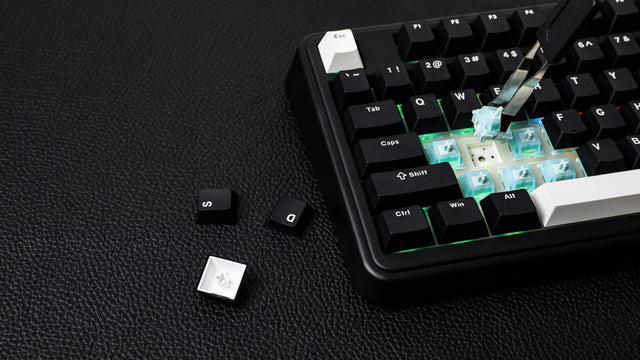
However, some TMR keyboards use a hybrid hot-swappable PCB that can support both magnetic switches and traditional 3/5-pin mechanical switches. This does not mean that TMR itself changes the typing feel, but it can give users more freedom to choose different switches and customize how the keyboard feels.
In other words, the sensor affects how the keyboard responds, while the switch and physical keyboard design determine how it feels to type on.
Which One Should You Choose?
The HE75 V2 is a straightforward choice if you want a mature Hall Effect keyboard with adjustable actuation, Rapid Trigger, 8K polling, and a dedicated magnetic-switch setup.
The HE75 V2 TMR may be a better fit if you are interested in TMR sensing and want greater freedom to switch between magnetic and traditional mechanical switches. Its hybrid PCB gives you more flexibility to explore different switch types and typing feels.
Neither technology is universally better. The right choice depends on whether you prioritize a dedicated magnetic setup or greater switch flexibility.
Hall Effect or TMR: What Really Matters?
Hall Effect and TMR are two different ways of sensing magnetic key movement. Both allow a keyboard to understand key position and support more flexible input than a traditional pressed-or-released switch.
TMR brings potential advantages in sensitivity and power efficiency, while Hall Effect remains a mature and widely adopted solution. But neither sensor works alone.
The EPOMAKER HE75 V2 and HE75 V2 TMR show that choosing a magnetic keyboard is not simply about choosing the newest sensor. What matters is how the switch, sensor, PCB, firmware, and physical design work together to create the final experience.
The switch creates the movement. The sensor detects it. The complete keyboard determines how that technology feels in use.